


Intro
复习
target_include_directories(x option ${CMAKE_CURRENT_SOURCE_DIR}): ?- option INTERFACE: ?
target_link_libraries(x option y): ?- option INTERFACE: ?
今天的目标是学习两种表达式类似
$<condition:true_string>$<COMPILE_LANG_AND_ID:language,compiler_ids>
学习完成后我们需要拉取code然后用学习的表达式为编译器添加警告标志
开始
- 表达式就是表达式,很简单,但是类型很多。
- 这里就只先介绍两种
$<condition:true_string>

* 如果 `condition` 为 1,则此表达式结果为 `true_string`
* 如果 `condition` 为 0,则此表达式结果为空


$<COMPILE_LANG_AND_ID:language,compiler_ids>

* 如果当前所用的语言与 `language` 一致且编译器 ID 在 `compiler_ids` 的列表中,则表达式值为 1,否则为 0
* `language` 值主要为 `CXX` 和 `C`
* `compiler_ids` 主要有 GNU、Clang、MSVC 等,有多个时用逗号隔开- 根路径下的CMakeLists.txt
# TODO 1: Update the minimum required version to 3.15
cmake_minimum_required(VERSION 3.15)
# cmake_minimum_required(VERSION 3.10)

# set the project name and version
project(Tutorial VERSION 1.0)

# specify the C++ standard
add_library(tutorial_compiler_flags INTERFACE)
target_compile_features(tutorial_compiler_flags INTERFACE cxx_std_11)

# TODO 2: Create helper variables to determine which compiler we are using:
# * Create a new variable gcc_like_cxx that is true if we are using CXX and
#   any of the following compilers: ARMClang, AppleClang, Clang, GNU, LCC
# * Create a new variable msvc_cxx that is true if we are using CXX and MSVC
# Hint: Use set() and COMPILE_LANG_AND_ID

# 这里设置两个自定义名称的变量,用于判断当前编译器是否是gcc-like或者msvc
# $<COMPILE_LANG_AND_ID:a,b,c,d,e,f,g> 是固定的写法
# 编译时,如果当前编译器是a,b,c,d,e,f,g中的任意一个,则返回true,否则返回false
set(gcc_like_cxx "$<COMPILE_LANG_AND_ID:CXX,ARMClang,AppleClang,Clang,GNU,LCC>")
set(msvc_cxx "$<COMPILE_LANG_AND_ID:CXX,MSVC>")

# TODO 3: Add warning flag compile options to the interface library
# tutorial_compiler_flags.
# * For gcc_like_cxx, add flags -Wall;-Wextra;-Wshadow;-Wformat=2;-Wunused
# * For msvc_cxx, add flags -W3
# Hint: Use target_compile_options()

# 这里$<${}:a;b;c;d;e> 这个表达式中 对应的是 $<condition:true_string>表达式
# 如果编译器是gcc-like,则添加-Wall;-Wextra;-Wshadow;-Wformat=2;-Wunused
# 如果编译器是msvc,则添加-W3
# 如何判断编译器是gcc-like还是msvc呢?通过上面的自定义变量,在编译时会自动赋值true或者false
target_compile_options(tutorial_compiler_flags INTERFACE
  "$<${gcc_like_cxx}:-Wall;-Wextra;-Wshadow;-Wformat=2;-Wunused>"
  "$<${msvc_cxx}:-W3>"
)

# TODO 4: With nested generator expressions, only use the flags for the
# build-tree
# Hint: Use BUILD_INTERFACE

#  这里前面的部分依然是判断编译器是gcc-like还是msvc
# 后半部分 $<BUILD_INTERFACE:...>
# BUILD_INTERFACE 是 CMake 中的一个生成器表达式,用于区分构建树(build tree)和安装树(install tree)。
# 它通常用于在构建过程中添加特定的编译选项或包含目录,而不在安装时添加这些选项

# 构建树(Build Tree)
# 构建树是指项目在构建过程中生成的文件和目录结构。
# 它包含所有的中间文件、目标文件、生成的可执行文件和库文件等。
# 构建树通常位于构建目录中,构建目录是你运行CMake和构建工具(如Make或Ninja)的地方。

# 安装树(Install Tree)
# 安装树是指项目在安装过程中生成的文件和目录结构。
# 它包含最终安装到系统或指定安装路径中的文件,如可执行文件、库文件、头文件、配置文件等。
# 安装树通常位于安装目录中,安装目录是你指定的安装路径。

target_compile_options(tutorial_compiler_flags INTERFACE
  "$<${gcc_like_cxx}:$<BUILD_INTERFACE:-Wall;-Wextra;-Wshadow;-Wformat=2;-Wunused>>"
  "$<${msvc_cxx}:$<BUILD_INTERFACE:-W3>>"
)

# configure a header file to pass some of the CMake settings
# to the source code
configure_file(TutorialConfig.h.in TutorialConfig.h)

# add the MathFunctions library
add_subdirectory(MathFunctions)

# add the executable
add_executable(Tutorial tutorial.cxx)

target_link_libraries(Tutorial PUBLIC MathFunctions tutorial_compiler_flags)

# add the binary tree to the search path for include files
# so that we will find TutorialConfig.h
target_include_directories(Tutorial PUBLIC
                           "${PROJECT_BINARY_DIR}"
                           )
总结
- 表达式呢,主要起到一个动态替换的作用。
- A菌随手一搜呢就出现很多。
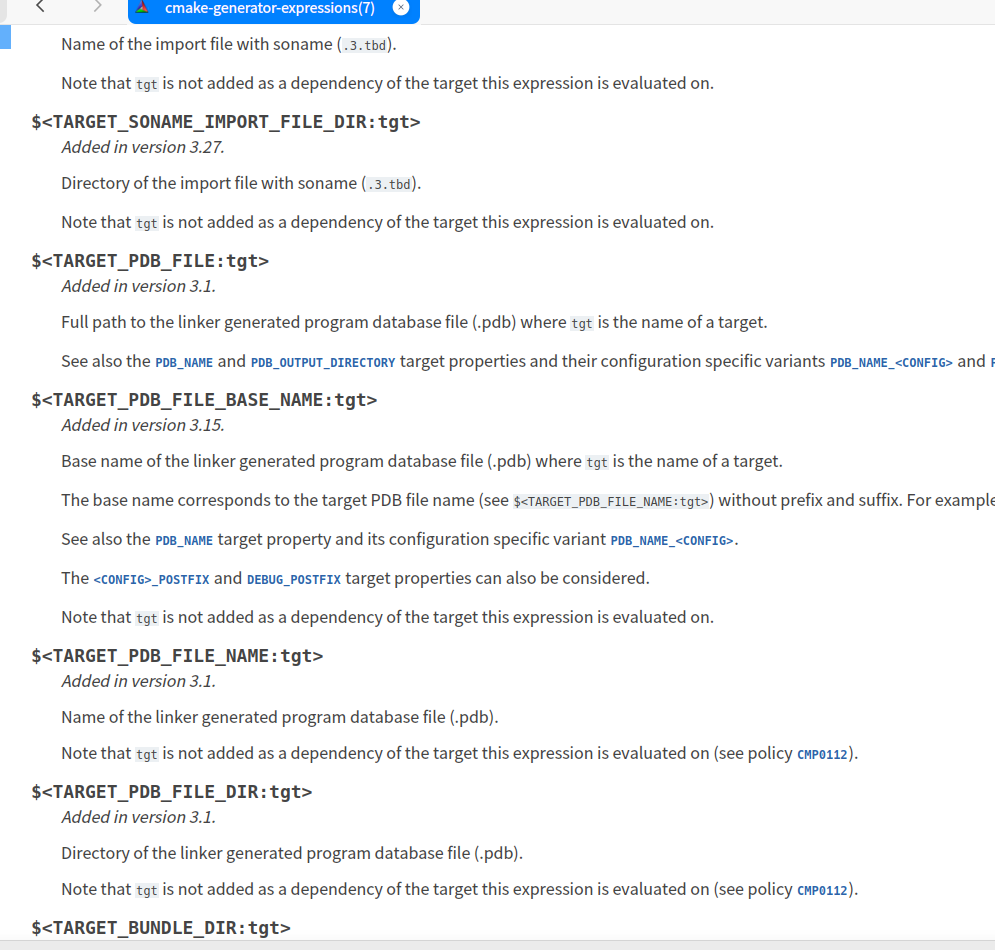
- 所以不要纠结,用到再找哦。
所属系列
从当前文章继续阅读它所在合集中的前后内容。
A菌严肃的CMake手记 第 6 / 13 篇
查看合集 我也是從零開始學習CMAKE這個軟體
相关文章
优先推荐同专题、同标签和同作者内容,补足热门文章。
![[#12][课题1][A菌严肃的CMake手记]](data:image/svg+xml,%3Csvg%20xmlns%3D%22http%3A%2F%2Fwww.w3.org%2F2000%2Fsvg%22%20width%3D%22800%22%20height%3D%22400%22%20viewBox%3D%220%200%20800%20400%22%3E%0A%20%20%3Cstyle%3E%0A%20%20%20%20.ph-from%20%7B%20stop-color%3A%20%23f1f5f9%3B%20%7D%0A%20%20%20%20.ph-to%20%7B%20stop-color%3A%20%23e2e8f0%3B%20%7D%0A%20%20%20%20.ph-title%20%7B%20fill%3A%20%23475569%3B%20%7D%0A%20%20%20%20%40media%20(prefers-color-scheme%3A%20dark)%20%7B%0A%20%20%20%20%20%20.ph-from%20%7B%20stop-color%3A%20%231e293b%3B%20%7D%0A%20%20%20%20%20%20.ph-to%20%7B%20stop-color%3A%20%230f172a%3B%20%7D%0A%20%20%20%20%20%20.ph-title%20%7B%20fill%3A%20%23cbd5e1%3B%20%7D%0A%20%20%20%20%7D%0A%20%20%3C%2Fstyle%3E%0A%20%20%3Cdefs%3E%0A%20%20%20%20%3ClinearGradient%20id%3D%22g%22%20x1%3D%220%25%22%20y1%3D%220%25%22%20x2%3D%22100%25%22%20y2%3D%22100%25%22%3E%0A%20%20%20%20%20%20%3Cstop%20class%3D%22ph-from%22%20offset%3D%220%25%22%2F%3E%0A%20%20%20%20%20%20%3Cstop%20class%3D%22ph-to%22%20offset%3D%22100%25%22%2F%3E%0A%20%20%20%20%3C%2FlinearGradient%3E%0A%20%20%3C%2Fdefs%3E%0A%20%20%3Crect%20width%3D%22800%22%20height%3D%22400%22%20fill%3D%22url(%23g)%22%2F%3E%0A%20%20%3Ctext%20class%3D%22ph-title%22%20x%3D%22400%22%20y%3D%22169.4%22%20text-anchor%3D%22middle%22%0A%20%20%20%20%20%20font-family%3D%22system-ui%2Csans-serif%22%20font-size%3D%2272%22%20font-weight%3D%22700%22%3E%5B%2312%5D%5B%E8%AF%BE%E9%A2%981%5D%5BA%E8%8F%8C%3C%2Ftext%3E%0A%20%20%3Ctext%20class%3D%22ph-title%22%20x%3D%22400%22%20y%3D%22273.8%22%20text-anchor%3D%22middle%22%0A%20%20%20%20%20%20font-family%3D%22system-ui%2Csans-serif%22%20font-size%3D%2272%22%20font-weight%3D%22700%22%3E%E4%B8%A5%E8%82%83%E7%9A%84CMake%E6%89%8B%E8%AE%B0%5D%3C%2Ftext%3E%0A%3C%2Fsvg%3E)
![[#11][总结与复习和接下来的内容][A菌严肃的CMake手记]](data:image/svg+xml,%3Csvg%20xmlns%3D%22http%3A%2F%2Fwww.w3.org%2F2000%2Fsvg%22%20width%3D%22800%22%20height%3D%22400%22%20viewBox%3D%220%200%20800%20400%22%3E%0A%20%20%3Cstyle%3E%0A%20%20%20%20.ph-from%20%7B%20stop-color%3A%20%23f1f5f9%3B%20%7D%0A%20%20%20%20.ph-to%20%7B%20stop-color%3A%20%23e2e8f0%3B%20%7D%0A%20%20%20%20.ph-title%20%7B%20fill%3A%20%23475569%3B%20%7D%0A%20%20%20%20%40media%20(prefers-color-scheme%3A%20dark)%20%7B%0A%20%20%20%20%20%20.ph-from%20%7B%20stop-color%3A%20%231e293b%3B%20%7D%0A%20%20%20%20%20%20.ph-to%20%7B%20stop-color%3A%20%230f172a%3B%20%7D%0A%20%20%20%20%20%20.ph-title%20%7B%20fill%3A%20%23cbd5e1%3B%20%7D%0A%20%20%20%20%7D%0A%20%20%3C%2Fstyle%3E%0A%20%20%3Cdefs%3E%0A%20%20%20%20%3ClinearGradient%20id%3D%22g%22%20x1%3D%220%25%22%20y1%3D%220%25%22%20x2%3D%22100%25%22%20y2%3D%22100%25%22%3E%0A%20%20%20%20%20%20%3Cstop%20class%3D%22ph-from%22%20offset%3D%220%25%22%2F%3E%0A%20%20%20%20%20%20%3Cstop%20class%3D%22ph-to%22%20offset%3D%22100%25%22%2F%3E%0A%20%20%20%20%3C%2FlinearGradient%3E%0A%20%20%3C%2Fdefs%3E%0A%20%20%3Crect%20width%3D%22800%22%20height%3D%22400%22%20fill%3D%22url(%23g)%22%2F%3E%0A%20%20%3Ctext%20class%3D%22ph-title%22%20x%3D%22400%22%20y%3D%22119.5%22%20text-anchor%3D%22middle%22%0A%20%20%20%20%20%20font-family%3D%22system-ui%2Csans-serif%22%20font-size%3D%2270%22%20font-weight%3D%22700%22%3E%5B%2311%5D%5B%E6%80%BB%E7%BB%93%E4%B8%8E%E5%A4%8D%E4%B9%A0%E5%92%8C%3C%2Ftext%3E%0A%20%20%3Ctext%20class%3D%22ph-title%22%20x%3D%22400%22%20y%3D%22221.0%22%20text-anchor%3D%22middle%22%0A%20%20%20%20%20%20font-family%3D%22system-ui%2Csans-serif%22%20font-size%3D%2270%22%20font-weight%3D%22700%22%3E%E6%8E%A5%E4%B8%8B%E6%9D%A5%E7%9A%84%E5%86%85%E5%AE%B9%5D%5BA%E8%8F%8C%3C%2Ftext%3E%0A%20%20%3Ctext%20class%3D%22ph-title%22%20x%3D%22400%22%20y%3D%22322.5%22%20text-anchor%3D%22middle%22%0A%20%20%20%20%20%20font-family%3D%22system-ui%2Csans-serif%22%20font-size%3D%2270%22%20font-weight%3D%22700%22%3E%E4%B8%A5%E8%82%83%E7%9A%84CMake%E6%89%8B%E8%AE%B0%5D%3C%2Ftext%3E%0A%3C%2Fsvg%3E)
![[#10][Packaging an Installer][A菌严肃的CMake手记]](data:image/svg+xml,%3Csvg%20xmlns%3D%22http%3A%2F%2Fwww.w3.org%2F2000%2Fsvg%22%20width%3D%22800%22%20height%3D%22400%22%20viewBox%3D%220%200%20800%20400%22%3E%0A%20%20%3Cstyle%3E%0A%20%20%20%20.ph-from%20%7B%20stop-color%3A%20%23f1f5f9%3B%20%7D%0A%20%20%20%20.ph-to%20%7B%20stop-color%3A%20%23e2e8f0%3B%20%7D%0A%20%20%20%20.ph-title%20%7B%20fill%3A%20%23475569%3B%20%7D%0A%20%20%20%20%40media%20(prefers-color-scheme%3A%20dark)%20%7B%0A%20%20%20%20%20%20.ph-from%20%7B%20stop-color%3A%20%231e293b%3B%20%7D%0A%20%20%20%20%20%20.ph-to%20%7B%20stop-color%3A%20%230f172a%3B%20%7D%0A%20%20%20%20%20%20.ph-title%20%7B%20fill%3A%20%23cbd5e1%3B%20%7D%0A%20%20%20%20%7D%0A%20%20%3C%2Fstyle%3E%0A%20%20%3Cdefs%3E%0A%20%20%20%20%3ClinearGradient%20id%3D%22g%22%20x1%3D%220%25%22%20y1%3D%220%25%22%20x2%3D%22100%25%22%20y2%3D%22100%25%22%3E%0A%20%20%20%20%20%20%3Cstop%20class%3D%22ph-from%22%20offset%3D%220%25%22%2F%3E%0A%20%20%20%20%20%20%3Cstop%20class%3D%22ph-to%22%20offset%3D%22100%25%22%2F%3E%0A%20%20%20%20%3C%2FlinearGradient%3E%0A%20%20%3C%2Fdefs%3E%0A%20%20%3Crect%20width%3D%22800%22%20height%3D%22400%22%20fill%3D%22url(%23g)%22%2F%3E%0A%20%20%3Ctext%20class%3D%22ph-title%22%20x%3D%22400%22%20y%3D%22126.4%22%20text-anchor%3D%22middle%22%0A%20%20%20%20%20%20font-family%3D%22system-ui%2Csans-serif%22%20font-size%3D%2264%22%20font-weight%3D%22700%22%3E%5B%2310%5D%5BPackaging%20an%3C%2Ftext%3E%0A%20%20%3Ctext%20class%3D%22ph-title%22%20x%3D%22400%22%20y%3D%22219.2%22%20text-anchor%3D%22middle%22%0A%20%20%20%20%20%20font-family%3D%22system-ui%2Csans-serif%22%20font-size%3D%2264%22%20font-weight%3D%22700%22%3EInstaller%5D%5BA%E8%8F%8C%E4%B8%A5%E8%82%83%3C%2Ftext%3E%0A%20%20%3Ctext%20class%3D%22ph-title%22%20x%3D%22400%22%20y%3D%22312.0%22%20text-anchor%3D%22middle%22%0A%20%20%20%20%20%20font-family%3D%22system-ui%2Csans-serif%22%20font-size%3D%2264%22%20font-weight%3D%22700%22%3E%E7%9A%84CMake%E6%89%8B%E8%AE%B0%5D%3C%2Ftext%3E%0A%3C%2Fsvg%3E)
![[#99][关于Windows离开MSYS2或CYGWIN如何构建项目][A菌严肃的CMake手记]](data:image/svg+xml,%3Csvg%20xmlns%3D%22http%3A%2F%2Fwww.w3.org%2F2000%2Fsvg%22%20width%3D%22800%22%20height%3D%22400%22%20viewBox%3D%220%200%20800%20400%22%3E%0A%20%20%3Cstyle%3E%0A%20%20%20%20.ph-from%20%7B%20stop-color%3A%20%23f1f5f9%3B%20%7D%0A%20%20%20%20.ph-to%20%7B%20stop-color%3A%20%23e2e8f0%3B%20%7D%0A%20%20%20%20.ph-title%20%7B%20fill%3A%20%23475569%3B%20%7D%0A%20%20%20%20%40media%20(prefers-color-scheme%3A%20dark)%20%7B%0A%20%20%20%20%20%20.ph-from%20%7B%20stop-color%3A%20%231e293b%3B%20%7D%0A%20%20%20%20%20%20.ph-to%20%7B%20stop-color%3A%20%230f172a%3B%20%7D%0A%20%20%20%20%20%20.ph-title%20%7B%20fill%3A%20%23cbd5e1%3B%20%7D%0A%20%20%20%20%7D%0A%20%20%3C%2Fstyle%3E%0A%20%20%3Cdefs%3E%0A%20%20%20%20%3ClinearGradient%20id%3D%22g%22%20x1%3D%220%25%22%20y1%3D%220%25%22%20x2%3D%22100%25%22%20y2%3D%22100%25%22%3E%0A%20%20%20%20%20%20%3Cstop%20class%3D%22ph-from%22%20offset%3D%220%25%22%2F%3E%0A%20%20%20%20%20%20%3Cstop%20class%3D%22ph-to%22%20offset%3D%22100%25%22%2F%3E%0A%20%20%20%20%3C%2FlinearGradient%3E%0A%20%20%3C%2Fdefs%3E%0A%20%20%3Crect%20width%3D%22800%22%20height%3D%22400%22%20fill%3D%22url(%23g)%22%2F%3E%0A%20%20%3Ctext%20class%3D%22ph-title%22%20x%3D%22400%22%20y%3D%2295.0%22%20text-anchor%3D%22middle%22%0A%20%20%20%20%20%20font-family%3D%22system-ui%2Csans-serif%22%20font-size%3D%2256%22%20font-weight%3D%22700%22%3E%5B%2399%5D%5B%E5%85%B3%E4%BA%8EWindows%E7%A6%BB%E5%BC%80%3C%2Ftext%3E%0A%20%20%3Ctext%20class%3D%22ph-title%22%20x%3D%22400%22%20y%3D%22176.2%22%20text-anchor%3D%22middle%22%0A%20%20%20%20%20%20font-family%3D%22system-ui%2Csans-serif%22%20font-size%3D%2256%22%20font-weight%3D%22700%22%3EMSYS2%E6%88%96CYGWIN%E5%A6%82%E4%BD%95%E6%9E%84%E5%BB%BA%3C%2Ftext%3E%0A%20%20%3Ctext%20class%3D%22ph-title%22%20x%3D%22400%22%20y%3D%22257.4%22%20text-anchor%3D%22middle%22%0A%20%20%20%20%20%20font-family%3D%22system-ui%2Csans-serif%22%20font-size%3D%2256%22%20font-weight%3D%22700%22%3E%E9%A1%B9%E7%9B%AE%5D%5BA%E8%8F%8C%E4%B8%A5%E8%82%83%E7%9A%84CMake%E6%89%8B%3C%2Ftext%3E%0A%20%20%3Ctext%20class%3D%22ph-title%22%20x%3D%22400%22%20y%3D%22338.6%22%20text-anchor%3D%22middle%22%0A%20%20%20%20%20%20font-family%3D%22system-ui%2Csans-serif%22%20font-size%3D%2256%22%20font-weight%3D%22700%22%3E%E8%AE%B0%5D%3C%2Ftext%3E%0A%3C%2Fsvg%3E)
![[#9][Adding a Custom Command and Generated File][A菌严肃的CMake手记]](data:image/svg+xml,%3Csvg%20xmlns%3D%22http%3A%2F%2Fwww.w3.org%2F2000%2Fsvg%22%20width%3D%22800%22%20height%3D%22400%22%20viewBox%3D%220%200%20800%20400%22%3E%0A%20%20%3Cstyle%3E%0A%20%20%20%20.ph-from%20%7B%20stop-color%3A%20%23f1f5f9%3B%20%7D%0A%20%20%20%20.ph-to%20%7B%20stop-color%3A%20%23e2e8f0%3B%20%7D%0A%20%20%20%20.ph-title%20%7B%20fill%3A%20%23475569%3B%20%7D%0A%20%20%20%20%40media%20(prefers-color-scheme%3A%20dark)%20%7B%0A%20%20%20%20%20%20.ph-from%20%7B%20stop-color%3A%20%231e293b%3B%20%7D%0A%20%20%20%20%20%20.ph-to%20%7B%20stop-color%3A%20%230f172a%3B%20%7D%0A%20%20%20%20%20%20.ph-title%20%7B%20fill%3A%20%23cbd5e1%3B%20%7D%0A%20%20%20%20%7D%0A%20%20%3C%2Fstyle%3E%0A%20%20%3Cdefs%3E%0A%20%20%20%20%3ClinearGradient%20id%3D%22g%22%20x1%3D%220%25%22%20y1%3D%220%25%22%20x2%3D%22100%25%22%20y2%3D%22100%25%22%3E%0A%20%20%20%20%20%20%3Cstop%20class%3D%22ph-from%22%20offset%3D%220%25%22%2F%3E%0A%20%20%20%20%20%20%3Cstop%20class%3D%22ph-to%22%20offset%3D%22100%25%22%2F%3E%0A%20%20%20%20%3C%2FlinearGradient%3E%0A%20%20%3C%2Fdefs%3E%0A%20%20%3Crect%20width%3D%22800%22%20height%3D%22400%22%20fill%3D%22url(%23g)%22%2F%3E%0A%20%20%3Ctext%20class%3D%22ph-title%22%20x%3D%22400%22%20y%3D%2298.8%22%20text-anchor%3D%22middle%22%0A%20%20%20%20%20%20font-family%3D%22system-ui%2Csans-serif%22%20font-size%3D%2254%22%20font-weight%3D%22700%22%3E%5B%239%5D%5BAdding%20a%20Custom%3C%2Ftext%3E%0A%20%20%3Ctext%20class%3D%22ph-title%22%20x%3D%22400%22%20y%3D%22177.1%22%20text-anchor%3D%22middle%22%0A%20%20%20%20%20%20font-family%3D%22system-ui%2Csans-serif%22%20font-size%3D%2254%22%20font-weight%3D%22700%22%3ECommand%20and%20Generated%3C%2Ftext%3E%0A%20%20%3Ctext%20class%3D%22ph-title%22%20x%3D%22400%22%20y%3D%22255.4%22%20text-anchor%3D%22middle%22%0A%20%20%20%20%20%20font-family%3D%22system-ui%2Csans-serif%22%20font-size%3D%2254%22%20font-weight%3D%22700%22%3EFile%5D%5BA%E8%8F%8C%E4%B8%A5%E8%82%83%E7%9A%84CMake%E6%89%8B%3C%2Ftext%3E%0A%20%20%3Ctext%20class%3D%22ph-title%22%20x%3D%22400%22%20y%3D%22333.6%22%20text-anchor%3D%22middle%22%0A%20%20%20%20%20%20font-family%3D%22system-ui%2Csans-serif%22%20font-size%3D%2254%22%20font-weight%3D%22700%22%3E%E8%AE%B0%5D%3C%2Ftext%3E%0A%3C%2Fsvg%3E)
![[#8][Adding System Introspection][A菌严肃的CMake手记]](data:image/svg+xml,%3Csvg%20xmlns%3D%22http%3A%2F%2Fwww.w3.org%2F2000%2Fsvg%22%20width%3D%22800%22%20height%3D%22400%22%20viewBox%3D%220%200%20800%20400%22%3E%0A%20%20%3Cstyle%3E%0A%20%20%20%20.ph-from%20%7B%20stop-color%3A%20%23f1f5f9%3B%20%7D%0A%20%20%20%20.ph-to%20%7B%20stop-color%3A%20%23e2e8f0%3B%20%7D%0A%20%20%20%20.ph-title%20%7B%20fill%3A%20%23475569%3B%20%7D%0A%20%20%20%20%40media%20(prefers-color-scheme%3A%20dark)%20%7B%0A%20%20%20%20%20%20.ph-from%20%7B%20stop-color%3A%20%231e293b%3B%20%7D%0A%20%20%20%20%20%20.ph-to%20%7B%20stop-color%3A%20%230f172a%3B%20%7D%0A%20%20%20%20%20%20.ph-title%20%7B%20fill%3A%20%23cbd5e1%3B%20%7D%0A%20%20%20%20%7D%0A%20%20%3C%2Fstyle%3E%0A%20%20%3Cdefs%3E%0A%20%20%20%20%3ClinearGradient%20id%3D%22g%22%20x1%3D%220%25%22%20y1%3D%220%25%22%20x2%3D%22100%25%22%20y2%3D%22100%25%22%3E%0A%20%20%20%20%20%20%3Cstop%20class%3D%22ph-from%22%20offset%3D%220%25%22%2F%3E%0A%20%20%20%20%20%20%3Cstop%20class%3D%22ph-to%22%20offset%3D%22100%25%22%2F%3E%0A%20%20%20%20%3C%2FlinearGradient%3E%0A%20%20%3C%2Fdefs%3E%0A%20%20%3Crect%20width%3D%22800%22%20height%3D%22400%22%20fill%3D%22url(%23g)%22%2F%3E%0A%20%20%3Ctext%20class%3D%22ph-title%22%20x%3D%22400%22%20y%3D%22126.4%22%20text-anchor%3D%22middle%22%0A%20%20%20%20%20%20font-family%3D%22system-ui%2Csans-serif%22%20font-size%3D%2264%22%20font-weight%3D%22700%22%3E%5B%238%5D%5BAdding%20System%3C%2Ftext%3E%0A%20%20%3Ctext%20class%3D%22ph-title%22%20x%3D%22400%22%20y%3D%22219.2%22%20text-anchor%3D%22middle%22%0A%20%20%20%20%20%20font-family%3D%22system-ui%2Csans-serif%22%20font-size%3D%2264%22%20font-weight%3D%22700%22%3EIntrospection%5D%5BA%E8%8F%8C%3C%2Ftext%3E%0A%20%20%3Ctext%20class%3D%22ph-title%22%20x%3D%22400%22%20y%3D%22312.0%22%20text-anchor%3D%22middle%22%0A%20%20%20%20%20%20font-family%3D%22system-ui%2Csans-serif%22%20font-size%3D%2264%22%20font-weight%3D%22700%22%3E%E4%B8%A5%E8%82%83%E7%9A%84CMake%E6%89%8B%E8%AE%B0%5D%3C%2Ftext%3E%0A%3C%2Fsvg%3E)
评论 1
登录 后参与评论
今天的內容真是有夠水的